Last updated January 14, 2026
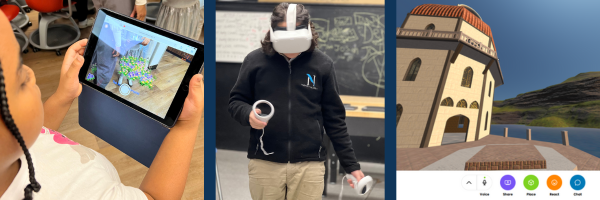
Augmented reality (AR) and virtual reality (VR) are transforming the way students explore STEM concepts, careers, and real-world problem solving. This resource hub is designed for educators, facilitators, and program leaders who want practical, classroom-ready ways to integrate immersive technology into teaching and learning. Whether you are brand new to AR and VR or looking to expand how you use immersive tools with students, you’ll find examples, lesson ideas, and implementation tips that support engaging, hands-on instruction across grade levels and subject areas.
How to Use This Page
-
Browse by purpose: Explore resources based on classroom goals such as lesson enhancement, student engagement, or project-based learning.
-
Start small: Choose one AR or VR activity to test with students before expanding.
-
Check requirements: Each resource includes notes on devices, time needed, and grade-level fit.
-
Revisit often: This page is updated with new immersive learning resources, tools, and examples educators can use throughout the school year.
Getting Started with Virtual Reality (VR) and Augmented Reality (AR)

What’s the Difference Between AR and VR?
-
Augmented Reality (AR) overlays digital content—such as images, 3D models, or videos—onto the real world using a device like a smartphone or tablet. AR works well for quick activities, stations, and print-based lessons.
-
Virtual Reality (VR) places students inside a fully immersive digital environment using a headset. VR is ideal for exploration, simulations, and experiences that would be difficult or impossible to access in a traditional classroom.
Classroom Requirements
- Reliable internet connection (recommended for most experiences)
- Student devices (shared or 1:1)
- Headphones (recommended if using a Chromebook or computer)
- A small open area for VR use
- Clear classroom norms for movement and safety
How to Use This Page
-
Browse by purpose: Explore resources based on classroom goals such as lesson enhancement, student engagement, or project-based learning.
-
Start small: Choose one AR or VR activity to test with students before expanding.
-
Check requirements: Each resource includes notes on devices, time needed, and grade-level fit.
-
Revisit often: This page is updated with new immersive learning resources, tools, and examples educators can use throughout the school year.
BrainSTEM Metaversity
A learn-to-earn platform by BrainSTEM University where students explore STEM, AI, AR, and VR experiences through interactive quests.
-
Offers VR/AR-based learning modules and teacher progress tracking.
-
Free or low-cost access for partner schools and nonprofit programs.
-
Ideal for: After-school programs, STEM camps, digital literacy units.
Virtual Reality (VR) Platforms & Apps
1. Wander
-
Type: Google Street View in VR
-
Use: Explore the world in immersive 360°; great for geography, history, and cultural studies.
-
Cost: ~$9.99 one-time
-
Access: Meta Quest Store
2. Mission: ISS
-
Type: Free VR simulation
-
Use: Experience life aboard the International Space Station.
-
Cost: Free
-
Access: Meta Quest Store
3. Anne Frank House VR
-
Type: Historical VR experience
-
Use: Virtual tour of Anne Frank’s secret annex; powerful social studies tie-in.
-
Cost: Free
-
Access: Meta Quest Store
4. Titans of Space 2.0
-
Type: VR astronomy exploration
-
Use: Take a guided tour through the solar system and beyond.
-
Cost: ~$9.99
-
Access: Meta Quest Store
5. YouTube VR
-
Type: 360° video platform
-
Use: Access thousands of educational VR experiences for free.
-
Cost: Free
-
Access: Meta Quest Store or browser
Augmented Reality (AR) Apps
1. Merge EDU
-
Type: AR + 3D learning system with digital “Merge Cubes”
-
Use: Explore 3D science objects like cells, fossils, and planets.
-
Cost: Free version available; premium school plans offered
2. QuiverVision
-
Type: AR coloring and learning app
-
Use: Students color pages, then bring them to life in 3D.
-
Cost: Free basic app; premium packs optional
Web-Based Immersive Experiences
1. Google Arts & Culture
-
Type: 360° tours and museum explorations
-
Use: Visit global landmarks, art museums, and historical exhibits in 3D.
-
Cost: Free
2. CoSpaces Edu
-
Type: Create your own 3D worlds, stories, and VR simulations
-
Use: Students build interactive scenes and code them with block or text-based coding.
-
Cost: Free plan with upgrades available
Conclusion
Immersive technology is transforming the way students learn—bringing science, history, and creativity to life through hands-on exploration and virtual experiences. Whether you’re introducing virtual reality in the classroom, adding an augmented reality twist to a lesson, or guiding students through digital 3D spaces, there are more free and affordable tools available than ever before.
At BrainSTEM EdTech, we believe access to immersive learning shouldn’t be limited by cost or complexity. This curated list of free and low-cost immersive technology apps, websites, and experiences—including our very own BrainSTEM Metaversity—is designed to help teachers spark curiosity, boost engagement, and create meaningful, future-ready learning environments.